Community theme · Real & working
QQ2007 Retro
Codex, but it's 2007 and you just signed in to QQ — sky-blue chrome, penguin avatar, "I'm online".
✓ Real theme, verified by its author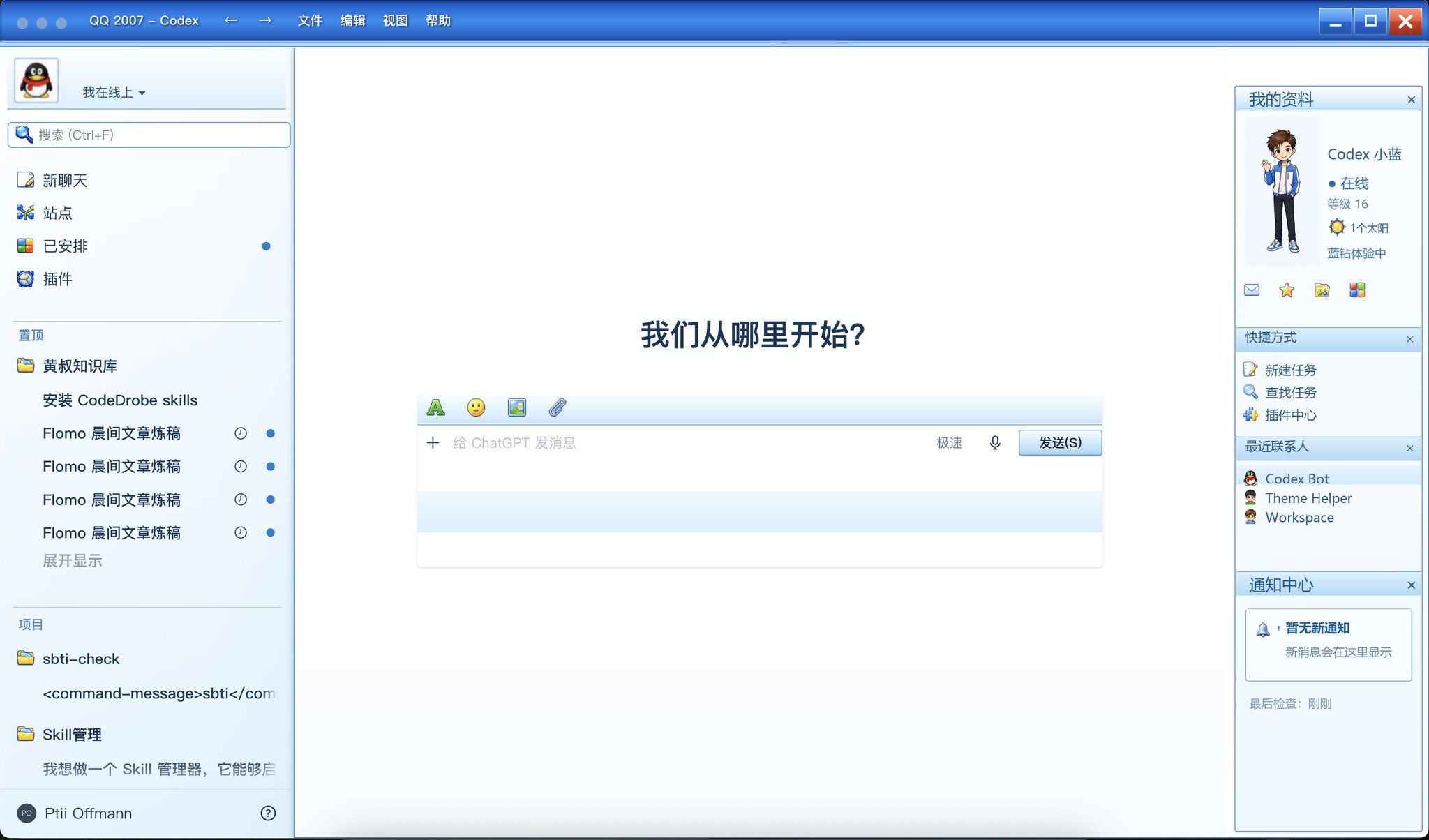
The original post
Embedded from X — the author's full announcement, verbatim.
开发好了,QQ2007的Codex主题包
— AI产品黄叔 (@PMbackttfuture) View the post on X ↗
真实可用,创意来自 @randyloop
目前右侧边栏是静态图片
使用方式也很简单,把评论区的skill安装上,以及黄叔提供的主题文件拖入Codex,再输入提示词即可:
"请使用 CodeDrobe Core 0.3.0 检查、应用并验证这个 .codedrobe-theme 文件。如需关闭或重启 Codex,请先询问我;完成后生成验证截图。"
Install, step by step
The complete flow from the author's post, expanded so you can finish it from this page.
Step 1 — Install the theme skill
Install the CodexSkins theme-manager skill (the same one used across this site). One command, Node.js 20+:
npx skills add qcrao/codedrobe-one-shot-theme-skill --skill codedrobe-theme-manager --global --agent codex --yesPrefer a plain CLI? The runtime also installs globally:
npm install --global @codedrobe/core
codedrobe appsStep 2 — Get the theme file
Option A · The author's original file: grab the .codedrobe-theme file 黄叔 shares in the original post and its replies, and drop it into Codex (or save it to ~/Downloads).
Option B · Generate it yourself, right here: download the reference screenshot below to ~/Downloads/qq2007-reference.jpg, then let the skill build the same look from the image — no external downloads needed.
Then send Codex this prompt:
Use $codedrobe-one-shot-theme from https://www.codexskins.org/SKILL.md with ~/Downloads/qq2007-reference.jpg as the reference image to generate a QQ2007-retro .codedrobe-theme for Codex: classic sky-blue chrome, QQ2007 sidebar and "My Profile" panel styling. Check, apply and verify it; ask me before closing or restarting Codex, and produce a verification screenshot when done.Step 3 — Apply and verify
With the theme file in place (Option A), send the author's exact prompt — quoted verbatim from the post:
Use CodeDrobe Core 0.3.0 to check, apply and verify this .codedrobe-theme file. Ask me before closing or restarting Codex; generate a verification screenshot when done.Restore anytime
Run restore first. If the blue palette remains, fully quit and reopen Codex; the running process may cache host colors even after the theme injection is gone:
codedrobe restore --app codexGood to know
- The right "My Profile" sidebar is currently a static image — the author says so in the post; everything else stays native and clickable.
- Same data-only .codedrobe-theme format as other themes on this site: CSS + artwork + manifest, no scripts, fully reversible.
- This is a community creation. The original file is distributed by its author; the generate-from-image path produces your own variant inspired by the same reference.
Want the same workflow?
The skill workflow used here is the same one behind our Kung Fu Women's Football theme. Read how a theme like this gets made:
Read: Let Codex theme itself →
Our downloadable theme: Kung Fu Women's Football →